Tuesday, January 21, 2014

Discontinuous subnet masks

The subnet mask for a particular network is 255.255.31.0. Which of the following pairs of IP addressed could belong to this network? (GATE 2003)

A: 172.57.88.62 & 172.56.87.233
B: 10.35.28.2 & 10.35.29.4
C: 191.203.31.87 & 192.234.31.88
D: 128.8.129.43 & 128.8.161.55

Now here a lot of people get suspicious about the validity of this given subnet mask (31 = 00011111 ).
As according to the definition of subnet mask (from many renowned books, personally read 3 of them), this is a 32-bit number(for ipv4) where all the bits of the network part are represented as “1”and all the bits of the host part are represented as “0”. That means all 0’s should be following 1’s in a subnet mask.

Then that means this given subnet mask is wrong?
The answer is No. This subnet mask is completely fine. This is an example of a discontinuous subnet mask, which is no longer supported on most routers. Discontinuous subnet masks are still supported on some network access control devices for features like ACLs. (Sometimes, notably on Cisco routers, the subnet masks are written inverted, in this case, so you'll see 0.0.0.255, for example, to mean a /24). But practically these are not being used a lot nowadays. So Many people are unaware of this.

Those authors are also not wrong in their definition of a subnet mask. They are only referring to the latest trend being followed in Networking.

Now back to the question. The principle is the same: convert the dotted-quad IP addresses and mask to 32-bit unsigned integers and AND each address with the mask. If the results are the same, they're in the same subnet. 

NM = 255.255.31.0
• Hence, first, two parts of the n/w have to be same. Last part(third & fourth) can be anything.  This removes the possibility for A and C options.
• Now for B, consider the third part:
28 = 0001 1100
31 = 0001 1111
----------------------------
        0001 1100
 
29 = 0001 1101
31 = 0001 1111
----------------------------
        0001 1101
Last 5 bits are different. So they are not on the same network. 


• Now for D, consider the third part:
129 = 1000 0001
31  =  0001 1111
---------------------------
          1000 0001 


161 = 1010 0001
31   = 0001 1111
--------------------------
          1000 0001
Last 5 bits(network part) are same. Hence, the correct answer is D.

Friday, January 3, 2014

One Sided Love Stories

Some love stories start when they meet each other...
But then most love stories stop the moment they get to know each other...

As time passes by it feels as though the best love stories with fondest memories,
will always be the ones which were one sided love stories....
No promises were made or broken nor were there any bad memories,
those will always be the days of the beautiful one sided love stories....

The mystery and aura surrounding the angel entices you,
but you still wonder if cupid actually managed to hit you...
Her ever changing facebook profile captivates you,
but you wont send her a request fearing "who are you"...

You feel happy and you blush when you look at her...
You slowly turn around not to attract attention, but manage to take a peak at her...
The way she brushes her hair aside becomes your most awaited moment while staring at her,
but the moment she passes in front of you, you act as if you never looked at her....

With no expressions and expectations comes no rejections or dejections or depressions...
She'll always be "the one" rather than ending up being just another one....

One of the most treasured love stories will always be the one sided love stories....

#a poetry in diary.
#courtesy: prsnnaik

Tuesday, December 31, 2013

"Let's Live! Happy new year"

Life is beautiful. EnJoy it.
"Enjoy it Before committing your LaSt Mistake"
[happy new Year]
[start]

Friday, December 13, 2013

P.S. I loveD you '13

If 2013 was a person I would describe it as someone with whom I have a love - hate relationship(kind of kill you first and then take your name). When we met, it was a love at first sight. Thought everything will be fine from now onwards. but you around there somewhere in between started breaking the promises and sometimes dreams, sometimes hopes, Just to make me stronger. It may sound a long journey but it was just a second.

You don’t remember anything when you fall in love but you remember every detail when you are falling out of it, that was the second half of 2013. So, Miss 2013 took me to great places and in my imaginations the whole world. We had a good chance of being together but then I expected too much out of you and that was just the truth..with the cold breeze of December here you were looking at me but I was lost somewhere else, I took another ticket to find you, but realized you have left the old place. And now you are just a history, intact in my memory. 

My memory loves you, often asks about you. I talk about you with my best friend 2014, she loves to hear about you (she just nods in a hope) because that gives me happiness and she cares. We still have time(18 days or so) and we will make it great together.
I will bid adieu with a smile, I promise.

You are beautiful, always will be. You will be missed.
P.S. Mantosh

Friday, November 29, 2013

How to make MAC write on NTFS drive

By default Mac OS can only read NTFS, it cannot write to it.
Follow these steps to write on your NTFS disk(tested with MAC 10.8.5).
1. open Terminal
2. ls /Volumes/
    you can see all available Disks name.
3. Now I assume your external hard-disk name is "Mantosh Harddisk".
    diskutil info /Volumes/Mantosh Harddisk
     Now you must be seeing all the info related with your disk.
4. sudo vi /etc/fstab
    This is a system file, that's why you need to use sudo.
5. write the below line in this file.
    LABEL=Mantosh\040Harddisk none ntfs rw,auto,nobrowse 
    \040 is for space in hard-disk name.
    (if LABEL is not supported in your system, you can use UUID=NUMBER none ntfs rw,auto,nobrowse)
6. Quit Terminal and Now, just unmount and re-mount the disk.

Wait a minute, I don’t see my disk listed in the Finder window!
As of Mountain Lion, the “nobrowse” mount option is required for this to work. This means that the partition will not show up on your desktop. However, you can access it normally through Finder by doing the following:
  • Open Terminal and type “open /Volumes/THE_NAME_OF_YOUR_VOLUME” (without the quotes)
  • The Finder pops up automatically and you can see your disk listed there.

OR simply format your hard-disk to FAT file system.

Thursday, November 28, 2013

Solution: To change a local variable in Pdb

In the previous post, I had mentioned the problem. This is happening because the cache of the current frame gets  overridden by the contents of the real locals which undoes modifications made by the debugging user.

To have a solution for this issue, you need to make changes in your installed python package. Here are the steps.
Note: This change will be effective for Python 2.4 version(Tested with this version only)
1.  Login your mach as a root user.
2.  cd /usr/lib
3.  chmod 777 python2.4/pdb.py
4.  cp python2.4/pdb.py YOUR_BACKUP_LOC (Do not forget to have a backup of this file. We are going to make changes in this file)
5.  Make changes in /usr/lib/python2.4/pdb.py as said below.
6.  chmod 755  python2.4/pdb.py

Changeset for pdb.py.

--- a/Lib/pdb.py
+++ b/Lib/pdb.py
@@ -114,6 +118,10 @@ class Pdb(bdb.Bdb, cmd.Cmd):
 def setup(self, f, t):
        self.forget()
        self.stack, self.curindex = self.get_stack(f, t)
        self.curframe = self.stack[self.curindex][0]
+       # The f_locals dictionary is updated from the actual frame
+       # locals whenever the .f_locals accessor is called, so we
+       # cache it here to ensure that modifications are not overwritten.
+       self.curframe_locals = self.curframe.f_locals
        self.execRcLines()

@@ -202,7 +210,7 @@ class Pdb(bdb.Bdb, cmd.Cmd):
     def default(self, line):
         if line[:1] == '!': line = line[1:]
-        locals = self.curframe.f_locals
+       locals = self.curframe_locals
         globals = self.curframe.f_globals
         try:
             code = compile(line + '\n', '<stdin>', 'single')

@@ -360,7 +368,7 @@ class Pdb(bdb.Bdb, cmd.Cmd):
      def do_break(self, arg, temporary = 0):
                 .........
                 .........
                 try:
                     func = eval(arg,
                                 self.curframe.f_globals,
-                                self.curframe.f_locals)
+                               self.curframe_locals)
                 except:
                     func = arg
                 try:

@@ -681,7 +689,7 @@ class Pdb(bdb.Bdb, cmd.Cmd):
     def do_debug(self, arg):
         sys.settrace(None)
         globals = self.curframe.f_globals
-        locals = self.curframe.f_locals
+       locals = self.curframe_locals
         p = Pdb(self.completekey, self.stdin, self.stdout)
         p.prompt = "(%s) " % self.prompt.strip()
         print >>self.stdout, "ENTERING RECURSIVE DEBUGGER"

@@ -705,9 +713,8 @@ class Pdb(bdb.Bdb, cmd.Cmd):
    def do_args(self, arg):
-        f = self.curframe
-        co = f.f_code
-        dict = f.f_locals

+       co = self.curframe.f_code
+       dict = self.curframe_locals

         n = co.co_argcount
         if co.co_flags & 4: n = n+1
         if co.co_flags & 8: n = n+1

@@ -719,8 +726,8 @@ class Pdb(bdb.Bdb, cmd.Cmd):
     def do_retval(self, arg):
-        if '__return__' in self.curframe.f_locals:
-            print >>self.stdout, self.curframe.f_locals['__return__']

+       if '__return__' in self.curframe_locals:
+           print >>self.stdout, self.curframe_locals['__return__']

         else:
             print >>self.stdout, '*** Not yet returned!'
     do_rv = do_retval

@@ -728,7 +735,7 @@ class Pdb(bdb.Bdb, cmd.Cmd):
     def _getval(self, arg):
         try:
             return eval(arg, self.curframe.f_globals,
-                        self.curframe.f_locals)
+                       self.curframe_locals)
         except:
             t, v = sys.exc_info()[:2]
             if isinstance(t, str):

@@ -797,7 +804,7 @@ class Pdb(bdb.Bdb, cmd.Cmd):
     def do_whatis(self, arg):
         try:
             value = eval(arg, self.curframe.f_globals,
-                            self.curframe.f_locals)
+                           self.curframe_locals)
         except:
             t, v = sys.exc_info()[:2]
             if type(t) == type(''):

Note: This is not exactly a changeSet. You need to manually modify the code. Red code is existing code and should be removed and Green code should be replaced in those places.

Wednesday, November 27, 2013

Changing a local variable in the Python debugger

I know that there is some issue with pdb debugger when you try to change a local variable.
But while trying to get any possible workaround, encountered this.
Have a look at it.


In the above case, local variable x has been changed in pdb mode. All I did was not to stop at any point after changing this variable.

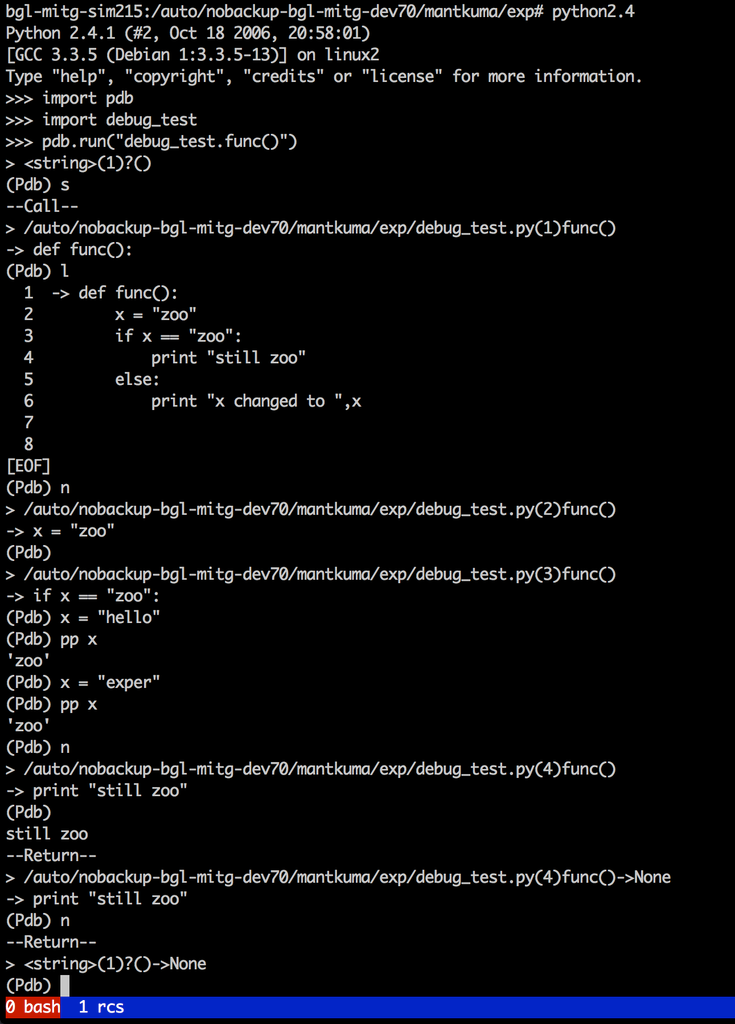
Now look at this.


Here local variable has not been changed. Here after changing its value to "hello" all I did was to go stepwise. Even tried again to change it to "exper" but that also didn't work.

This has been a long-standing issue, dating back at least to this 2004 post on this topic.  There must be some temporary patch available for this.

Look for my new post. As soon as I find the fix, will post that here.